Yield and Imaging Overhead Analysis
This section parses your NINA log file after the session ends to show exactly where your non-imaging time was spent. It helps you identify bottlenecks and optimize your imaging workflow.
Available at Full detail level only.
What It Shows
Summary Stat Boxes
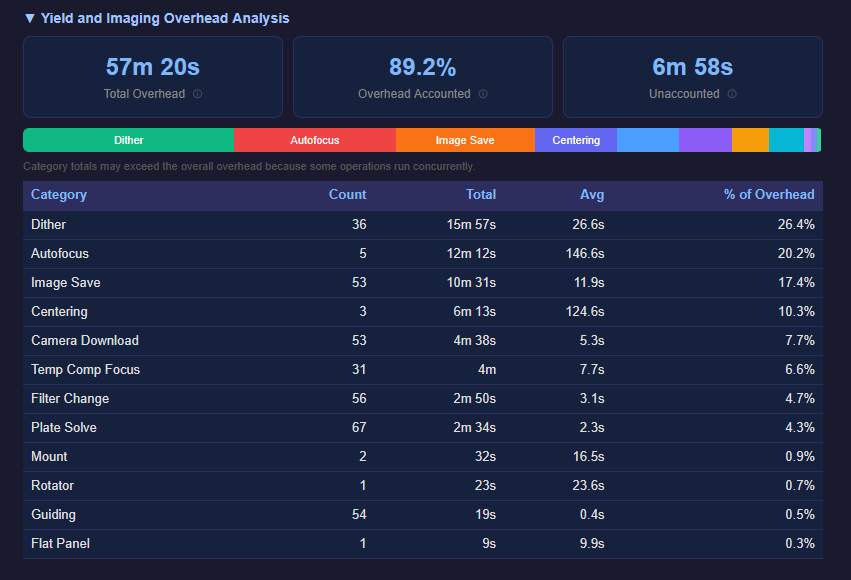
- Total Overhead — wall-clock time spent on non-imaging tasks. Overlapping operations (like image saves running during the next exposure) are counted only once using merged intervals.
- Overhead Accounted — percentage of “implied overhead” that the log parser was able to categorize. Implied overhead = imaging window minus total exposure time.
- Unaccounted — time the parser couldn’t attribute to any category. Small amounts are normal (inter-step gaps, NINA internal processing). If this is large, it may indicate operations not yet tracked by the parser.
Stacked Bar Chart
A color-coded horizontal bar showing the relative proportion of each overhead category. Categories with less than 0.5% of total overhead are excluded for readability.
Detailed Table
Each overhead category with:
- Event count (how many times it occurred)
- Total time spent
- Average time per event
Overhead Categories
| Category | What It Tracks |
|---|---|
| Camera Download | Time between exposure completion and readout. Derived by subtracting the requested exposure time from the total TakeExposure duration. |
| Filter Change | SwitchFilter operations |
| Dither | Guiding dither operations between exposures |
| Autofocus | RunAutofocus sequences |
| Temp Comp Focus | Temperature compensation focuser moves (MoveFocuserByTemperature) |
| Focuser Move | Direct focuser position moves (absolute or relative) |
| Plate Solve | SolveAndSync, SolveAndRotate operations |
| Centering | Center and CenterAndRotate operations |
| Image Save | Async image save operations (measured from NINA’s ImageSaveController). These typically overlap with the next exposure. |
| Slew | Telescope slew operations (SlewScopeToRaDec, SlewScopeToAltAz) |
| Meridian Flip | Meridian flip operations, including trigger-based flips that NINA handles internally (detected from AscomTelescope meridian flip log lines) |
| Guiding | StartGuiding and StopGuiding operations |
| Mount Ops | Park, unpark, find home, set tracking |
| Dome Sync | Dome synchronization |
| Dome Ops | Open/close shutter, park, slew dome |
| Flat Panel | Set brightness, toggle light, open/close cover |
| Camera Temp | CoolCamera and WarmCamera operations |
| Rotator | Mechanical rotator moves |
| Switch | USB switch value changes |
| Safety Wait | WaitUntilSafe operations (waiting for conditions to be safe) |
| Skipped Exposure | Exposures aborted mid-capture by quality triggers (e.g. guiding RMS threshold). Weather-aborted exposures are excluded from this category. |
Both the Yield percentage and the Overhead Accounted calculation exclude roof-closed (unsafe) time from their windows — so cloudy nights and safety events don’t penalize your yield or inflate your unaccounted overhead. If an exposure was in progress when the roof closed, that partial exposure time is treated as weather-lost (not overhead and not integration).
How Coverage Is Calculated
The parser uses merged intervals to calculate total overhead, not simple sums. This matters because some operations run concurrently:
- Image saves happen asynchronously during the next exposure
- Camera download overlaps with the end of the exposure command
To calculate coverage percentage:
- Imaging window = time from first parsed event to last parsed event, bounded by the Night Summary session start and end instructions
- Effective window = imaging window minus any roof-closed (unsafe) periods
- Implied overhead = effective window minus total exposure time
- Merged overhead = all overhead intervals merged to remove overlaps, with events inside roof-closed periods excluded
- Coverage = merged overhead / implied overhead (capped at 100%)
The log parser only looks at log lines between the Night Summary Start and Night Summary End sequence instructions, so events from other sequences or sessions don’t leak into the calculation.
Yield Cross-Validation
The overhead breakdown includes a cross-validation step that compares its parsed overhead against the yield calculation (which uses a completely different method). This helps validate that the log parser is correctly accounting for overhead time.
Tips for Reducing Overhead
- Camera download — if this is a large portion of your overhead, consider whether your USB connection speed can be improved (USB 3.0 vs 2.0, shorter cables)
- Autofocus — frequent autofocus is good for image quality but adds up. Consider whether temperature compensation can reduce the number of autofocus runs needed
- Filter changes — mechanical filter wheels take time. Consider trade-offs between using filter offsets and sequencial filter changes (LRGB LRGB) with imaging with a single filter at a time (LLLLLLLL).
- Dithering — necessary for good results, but aggressive dither settings result in lots of lost imaging time. Imaging using filter offsets and sequencial filter changes may reduce the number of required dithers.
- Image saves — these should mostly overlap with exposures. If they don’t (high unaccounted time), your disk may be slow